Developer Guide
Database Design
In our project database design is implemented separately by each member. For this reason the database design details are going to be covered separately by each member of the team. As a result E-R diagrams are also going to be shown separately by each member. Each member will explain in details corresponding components of database design implemented by that member.
You can find E/R diagrams and codes for each member in their developer guide section.
Database is created using ElephantSQL services. ElephantSQL runs PostgreSQL servers. The project can be accessed from https://hub.jazz.net/ by developers. Developers have to login to hub.jazz in order to access database. The project is also built and run in bluemix and can be run from http://itucsdb1513.mybluemix.net/
The code is also hosted on github.
Ira Shyti’s database connections and E-R diagram
E-R diagram for upcoming events and championships tables. The tables are connected with each other because the championship attribute of championships table is a foreign key to the championship attribute of the upcoming events table.

E-R diagram of upcoming events and championships tables
E-R diagram for history table. This is a simple table. It does nothaveany foreign key.
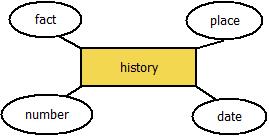
E-R diagram of history table
Javid Nuriyev’s database connections and E-R diagram
Database Design
In this part of the project there are 3 tables implemented. Those are Player Rankings table, Countries Rankings Table, and Player Info Table. The Player Rankings Table is created with the postgreSQL code in elephantSQL.
In the code shown in the developer guide section it can be noticed that a table references countries table and when the player’s country is updated it is updated in both tables. Moreover the country can not be deleted while player refereces this country thanks to the “RESTRICT” statement. One more important point worthy to mention is that name , surname pair is unique in this table.
Another table implemented by this developer is countries Ranking Table.
In this table the primary key is id, and the best_player is unique. Those are the major features of this table.
The last table implemented by this developer is Player Info table which shows information about players in the top rankings table.
In this table id is a primary key as well. Each country here references country from the countries table and when a country is updated this country is updated in both tables because of the “CASCADE” statement. Furthermore, the country can not be deleted if it is referenced by info of the player thanks to the “RESTRICT” statement. Also it is important to mention that foreign key here is a name, surname pair which is unique in this table and it points to the name, surname pair of the players in worldplayers table.
Codes are explained in details in the developer guide section.
ER Diagram
ER diagram of the database entities created in this part of the project :

Entity/Relation diagram
Mursit Sezen’s database connections and E-R diagram
There 3 tables in the rules of chess database. Relation between tables are shown in the below E/R Diagram.

E/R Diagram for Rules page
You can find details of the tables and database connections in developer guide section of Mursit’s, under table names.
Ahmet Gulum’s database connections and E-R diagram
Ahmet Turk’s database connections and E-R diagram
Database Connections of the project
We have implemented connections of the database in the server.py file where all the core python functions are implemented. The codes shown below were used to implement the database connections of the project.
def get_elephantsql_dsn(vcap_services):
    """Returns the data source name for ElephantSQL."""
    parsed = json.loads(vcap_services)
    uri = parsed["elephantsql"][0]["credentials"]["uri"]
    match = re.match('postgres://(.*?):(.*?)@(.*?)(:(\d+))?/(.*)', uri)
    user, password, host, _, port, dbname = match.groups()
    dsn = """user='{}' password='{}' host='{}' port={}
          dbname='{}'""".format(user, password, host, port, dbname)
   return dsn
if __name__ == '__main__':
 VCAP_APP_PORT = os.getenv('VCAP_APP_PORT')
 if VCAP_APP_PORT is not None:
     port, debug = int(VCAP_APP_PORT), False
 else:
     port, debug = 5000, True

 VCAP_SERVICES = os.getenv('VCAP_SERVICES')
 if VCAP_SERVICES is not None:
     app.config['dsn'] = get_elephantsql_dsn(VCAP_SERVICES)
 else:
     app.config['dsn'] = """user='vagrant' password='vagrant'
                            host='localhost' port=5432 dbname='itucsdb'"""

 app.run(host='0.0.0.0', port=port, debug=debug)